Using cider-mode
cider-mode is a pretty standard Emacs minor mode, which exists mostly to provide a
common keymap for all of CIDER’s REPL-powered commands that are meant to be used
from Clojure(Script) source buffers.
There you’ll find commands for evaluation, code and documentation lookup, debugging and other related functionality. This mode is the very heart of CIDER and it’s important to master it, so you can be productive.
Enabling cider-mode
cider-mode is normally enabled automatically when you start CIDER, but you can also enable it explicitly for Clojure(Script) buffers like this:
(add-hook 'clojure-mode-hook #'cider-mode)or if you are using clojure-ts-mode:
(add-hook 'clojure-ts-mode-hook #'cider-mode)
There’s no need to enable it explicitly for modes derived from clojure-mode or clojure-ts-mode like clojurescript-mode and clojure-ts-clojurescript-mode.
|
| See Using clojure-ts-mode for the current state of CIDER’s tree-sitter support. |
Disabling cider-mode
cider-mode is normally disabled automatically when you quit CIDER, but you can also disable it in any buffer explicitly by typing M-x cider-mode (provided it’s already enabled in that buffer).
Basic Workflow
Typically you’d begin your interaction with any source buffer by evaluating it with C-c C-k. Afterwards you’d normally evaluate just individual forms with C-c C-e (evaluate preceding form) or C-c C-c (evaluate current top-level form).
cider-mode shows at a glance whether the buffer is in sync with the REPL - a ` not-loaded` or ` stale` marker in the mode line, plus green/amber markers in the fringe. See Evaluation and Load-State Indicators.
|
From time to time some evaluation would take forever and you’d interrupt it with C-c C-b.
Jumping between source files and the REPL is as easy as pressing C-c C-z. If you invoke the command with a C-u prefix, while in a source buffer, it will also change the namespace of the REPL buffer to match that of the source buffer.
It’s also highly likely that you’d look up some definition with M-. or some documentation with C-c C-d C-d.
| Definition and documentation lookup commands work with both Java and Clojure. |
If you’re struggling to remember the name of some var you need, cider-apropos (C-c C-d a or C-c C-d C-a)
and cider-apropos-documentation (C-c C-d f or C-c C-d C-f) will help you find vars matching some string.
cider-mode also provides you with code completion that works out-of-the-box and requires no extra setup and eldoc integration.
Those few essential commands can get you really far in your day to day work. Keep on reading for a lot more information!
A Note on Keybinding Conventions
Many of CIDER’s keybindings are modeled on SLIME (the venerable Common Lisp environment) and on Emacs’s own bindings for evaluating Emacs Lisp. The essentials line up almost everywhere - C-x C-e (eval last sexp), C-M-x (eval top-level form), C-c C-k (load), C-c C-m / C-c M-m (macroexpand), M-. / M-, (jump to a definition and back), C-c C-d C-d (docs), C-c C-z (switch to the REPL) and C-c C-b (interrupt). We try to diverge only rarely, so that switching between Clojure, Common Lisp (SLIME/Sly) and Scheme (Geiser) stays as frictionless as possible.
Where CIDER does differ, it’s usually for a reason:
-
Inspect is on C-c M-i rather than SLIME’s C-c I. Emacs reserves
C-cfollowed by a plain letter for users' own bindings, so we keep to the modifier-and-control space that’s meant for modes. -
Tracing is on the C-c M-t prefix rather than SLIME’s C-c C-t, because CIDER uses C-c C-t for its test commands (something the Lisps don’t have).
-
CIDER has far more evaluation commands than the other tools, so beyond the handful of familiar top-level bindings the rest live under a dedicated C-c C-v eval prefix, rather than each claiming its own global key.
Command Menus
Each of CIDER’s command prefixes opens a transient menu that lists the commands in that group, grouped and labelled, so you can discover them without memorizing every key. For example, C-c C-d opens the documentation menu, C-c C-v the (large) evaluation menu, C-c C-t the test menu, and so on.
This is not a modal change: the menus reuse the same sub-keys as before, so
typing a full sequence still fires instantly without the menu ever popping up.
C-c C-d C-d runs cider-doc immediately; the menu only appears if you
pause after the prefix. There’s also a top-level cider-menu command (not
bound by default) that dispatches into all of the group menus, magit-style.
Some menus also offer arguments (toggled with - keys, magit-style) that tweak the commands for a single invocation, without touching your saved configuration:
-
the test menu (C-c C-t) can filter by selectors;
-
the namespace menu (C-c M-n) makes `cider-ns-refresh’s modes explicit toggles;
-
the macroexpand menu (C-c M-m) controls the expansion’s rendering;
-
the pretty-print menu (C-c C-v f) lets you pick the printer;
-
the jack-in/connect menu (C-c C-x) can set CLI aliases, the ClojureScript REPL type, or edit the command before it runs.
Opting out of the transient menus
If you’d rather keep the old behavior - a bare prefix keymap, e.g. for use with which-key or because you’ve added your own bindings under one of these prefixes - the original keymaps are still defined. Just rebind the prefix key back to its keymap:
(with-eval-after-load 'cider-mode
  (keymap-set cider-mode-map "C-c C-d" 'cider-doc-map)            ; documentation
  (keymap-set cider-mode-map "C-c C-v" 'cider-eval-commands-map)  ; evaluation
  (keymap-set cider-mode-map "C-c C-t" 'cider-test-commands-map)  ; test
  (keymap-set cider-mode-map "C-c M-n" 'cider-ns-map)             ; namespace
  (keymap-set cider-mode-map "C-c C-j" 'cider-insert-commands-map) ; insert in REPL
  (keymap-set cider-mode-map "C-c M-m" 'cider-macroexpand-map)    ; macroexpansion
  (keymap-set cider-mode-map "C-c C-=" 'cider-profile-menu)       ; profiling
  (keymap-set cider-mode-map "C-c C-w" 'cider-who-map))           ; call-graph queries
A couple of groups don’t map one-to-one onto an old keymap:
-
The jack-in/connect prefix C-c C-x is bound on
clojure-mode-map(and the REPL), notcider-mode-map; rebind it tocider-start-mapthere to restore the old prefix. -
Tracing (C-c M-t) never had a dedicated keymap - it was just C-c M-t v and C-c M-t n. Its menu is purely additive (it also exposes
cider-list-traced,cider-untrace-alland the trace buffer), so there’s nothing to revert; rebind those two keys directly if you want the flat bindings back.
Key Reference
The full list of cider-mode keybindings, grouped by task, lives on the
Keybindings reference page.
|
There’s no need to memorize these bindings. If you’re in a Clojure buffer with 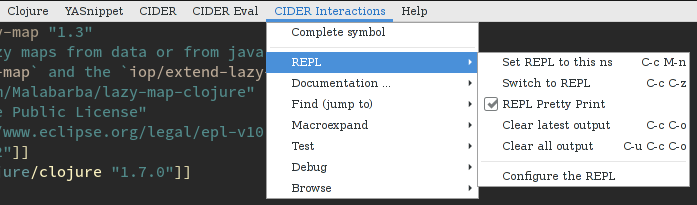
An even better solution would be to install which-key, which will automatically show you a list of available keybindings as you start typing some keys. This will simplify your interactions with CIDER quite a lot, especially in the beginning. Here’s what you’d see if you typed C-c C-d in a Clojure buffer: 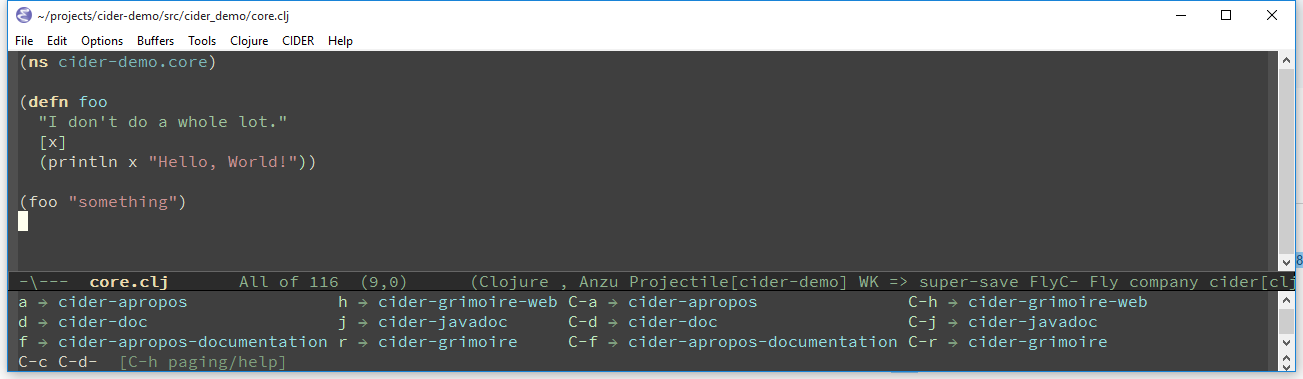
|
Deprecated Keybindings
As CIDER’s command set grows, some keybindings get reorganized - usually moved under a prefix group (like the documentation commands under C-c C-d). When that happens the old binding isn’t yanked away immediately: it keeps working for a deprecation window, but the first time you use it in a session it prints a one-time hint pointing at the replacement.
List everything currently deprecated, and what to use instead, with:
M-x cider-list-deprecated-keybindings
The old bindings keep working regardless; to silence the hints set:
(setq cider-warn-on-deprecated-keybindings nil)For example, the REPL-only jack-in/connect keys C-c M-j, C-c M-J, C-c M-c and C-c M-C have been superseded by the shared C-c C-x start map (C-c C-x j j, C-c C-x j s, C-c C-x c j, C-c C-x c s) since 0.18.0, so they now warn when used.