Macroexpansion
Typing C-c C-m after some form in a source buffer or the REPL will show
you the macroexpand-1 expansion of the form in a new buffer.
C-c M-m opens a menu (cider-macroexpand-menu) gathering all of CIDER’s
form-expanding commands:
| Keyboard shortcut | Description |
|---|---|
C-c M-m 1 |
|
C-c M-m a |
|
C-c M-m v |
|
C-c M-m V |
|
C-c M-m e |
Expand the macro at point one step, inline in the source buffer (see inline macro stepping below). |
C-c M-m E |
Fully expand the macro at point, inline in the source buffer. |
C-c M-m b |
Run an inline-style stepping session in a dedicated popup buffer. |
Choosing what to expand
Like the rest of CIDER’s form commands, the expansion commands act on the form preceding the cursor; see Selecting the Form to Operate On for why that’s the convention.
Macroexpansion has one wrinkle the other operations don’t, though: an expansion only makes sense for a call form. Expanding a bare symbol tells you nothing, and CIDER will refuse with "Not a macro" rather than pretend otherwise.
That’s why cider-macroexpand-1-at-point and cider-macroexpand-all-at-point
resolve their target a little differently from their sexp-at-point cousins.
Given (when x (foo bar)), with | marking the cursor:
| Cursor | Target |
|---|---|
|
|
|
|
|
|
In other words: point at the call you’re interested in, anywhere in it, and
you’ll expand that call. Here the cursor is sitting on the bare symbol
when, and the expansion is of the whole when form rather than of the
symbol:
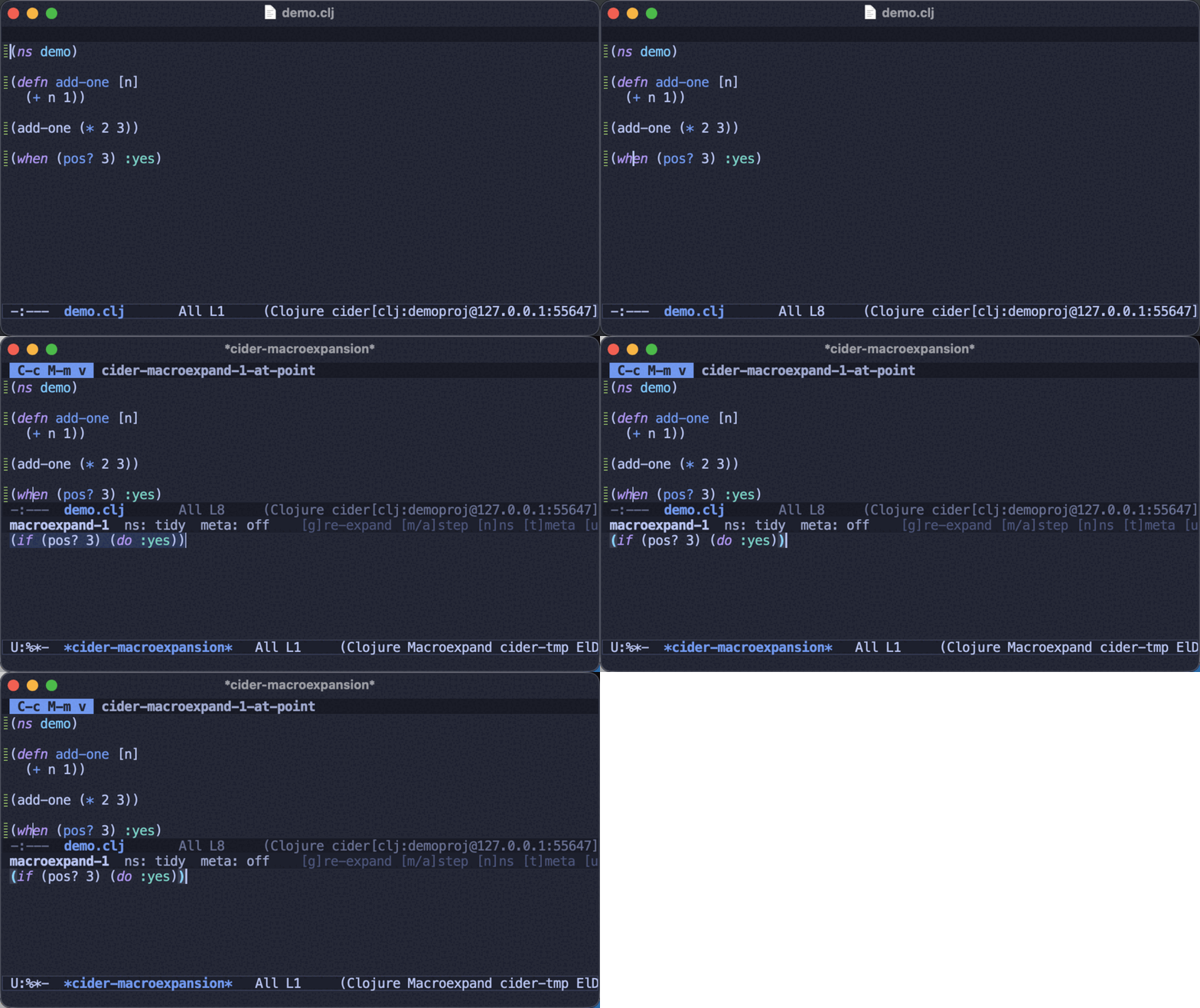
| The inline commands let you drill into a nested call without leaving the source buffer, and g re-runs the last expansion from inside the macroexpansion buffer. |
|
Prefer C-c C-m as the prefix instead? Point it at You’ll then reach plain |
When you expand into a buffer you’ll have access to additional keybindings there
(the buffer uses cider-macroexpansion-mode):
| Keyboard shortcut | Description |
|---|---|
m |
Invoke |
a |
Invoke |
g |
Re-expand the original form. This picks up the latest definition of the macro as well as any change to the display options below. |
n |
Cycle |
t |
Toggle |
C-/ |
Undo the last in-place expansion performed in the macroexpansion buffer. |
. |
Jump to the definition of the symbol at point. |
d |
Display documentation for the symbol at point. |
q |
Quit the macroexpansion buffer. |
| Macroexpansion resolves the macro in the running REPL, so its namespace has to be loaded. If it isn’t (or the form’s head isn’t actually a macro), CIDER tells you why - pointing you at C-c C-k when the namespace simply hasn’t been evaluated yet - instead of silently returning the form unchanged. |
Expansion levels
CIDER exposes three expanders, which map one-to-one onto the underlying Clojure functions. They differ in how deep they go:
-
macroexpand-1expands the form one step, and only when its head is a macro. It doesn’t re-expand the result or descend into sub-forms. This is what C-c C-m uses. -
macroexpandkeeps applyingmacroexpand-1to the head position until the head is no longer a macro. It still leaves nested macro calls in argument positions untouched. Reach for it via the prefixed C-u C-c C-m (or m with a prefix in the expansion buffer) - there’s no separate binding. -
macroexpand-all(reallyclojure.walk/macroexpand-all) walks the whole form recursively, expanding every macro it finds, nested ones included. This is what C-c M-m uses.
macroexpand-1 is literally a single step, so it can leave a macro behind - here
cond expands one clause-pair at a time:
(macroexpand-1 '(cond a 1 :else 2))
;; => (if a 1 (clojure.core/cond :else 2))   ; note the leftover cond
macroexpand chases the head all the way down. Given a macro that expands into
another macro, the difference from macroexpand-1 shows:
(defmacro unless [test & body]
  `(when (not ~test) ~@body))

(macroexpand-1 '(unless x a b))
;; => (clojure.core/when (clojure.core/not x) a b)   ; head is still `when', a macro

(macroexpand '(unless x a b))
;; => (if (clojure.core/not x) (do a b))             ; kept going: unless -> when -> if
But macroexpand only follows the head. A macro sitting in an argument position
is left alone, whereas macroexpand-all reaches it:
(macroexpand '(when a (when b c)))
;; => (if a (do (when b c)))            ; inner when untouched

(clojure.walk/macroexpand-all '(when a (when b c)))
;; => (if a (do (if b (do c))))         ; inner when expanded too
clojure.walk/macroexpand-all is a plain code walk - it doesn’t track
local bindings or fully honor quote, so it can occasionally expand something
the real compiler wouldn’t. It’s an excellent inspection tool, not a
semantics-preserving transformation.
|
Configuration
The option cider-macroexpansion-display-namespaces controls whether to display
namespaces in the macroexpansion buffer. It can be set to one of the following:
-
qualified- Vars are fully-qualified in the expansion. -
none- Vars are displayed without namespace qualification. -
tidy(default) - Vars that are :refer-ed or defined in the current namespace are displayed with their simple name, non-referred vars from other namespaces are referred using the alias for that namespace (if defined), other vars are displayed fully qualified.
The option cider-macroexpansion-print-metadata controls whether to print the var metadata
in the macroexpansion buffer. It’s set to nil by default.
Both options can also be overridden for a single expansion, without
touching your configuration: the macroexpand menu that pops up when you pause
after C-c M-m has a -n (--ns=) argument to pick the
namespace-display style (tidy, qualified or none) and a -m
(--meta) toggle for the metadata, honored by the popup expansion commands
(1 and a) invoked from the menu.
|
Inline macroexpansion
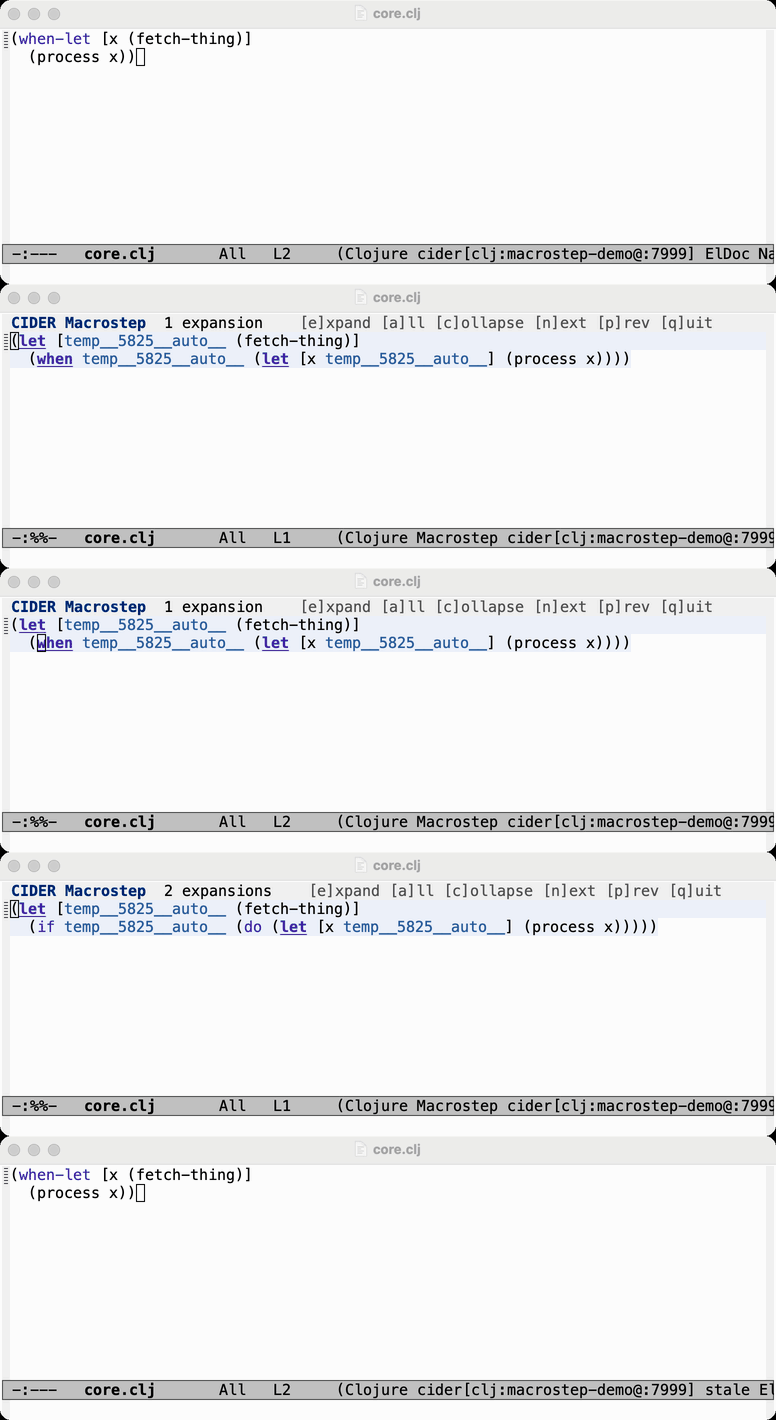
As an alternative to the separate buffer, cider-macrostep-expand expands
macros in place in the source buffer, in the spirit of the
macrostep package. Place point right after
a form (as with C-x C-e) and run M-x cider-macrostep-expand: the form is
replaced by its one-step expansion and you enter a transient, read-only
cider-macrostep-mode with these keybindings:
| Keyboard shortcut | Description |
|---|---|
e |
Expand the form before point one step further. Inside an existing expansion, put point after a nested form to step into it. |
a |
Fully expand the form before point in one step ( |
c |
Collapse the innermost expansion at point, restoring the original form. |
n |
Move to the next/previous further-expandable sub-form. |
q |
Collapse every expansion and leave |
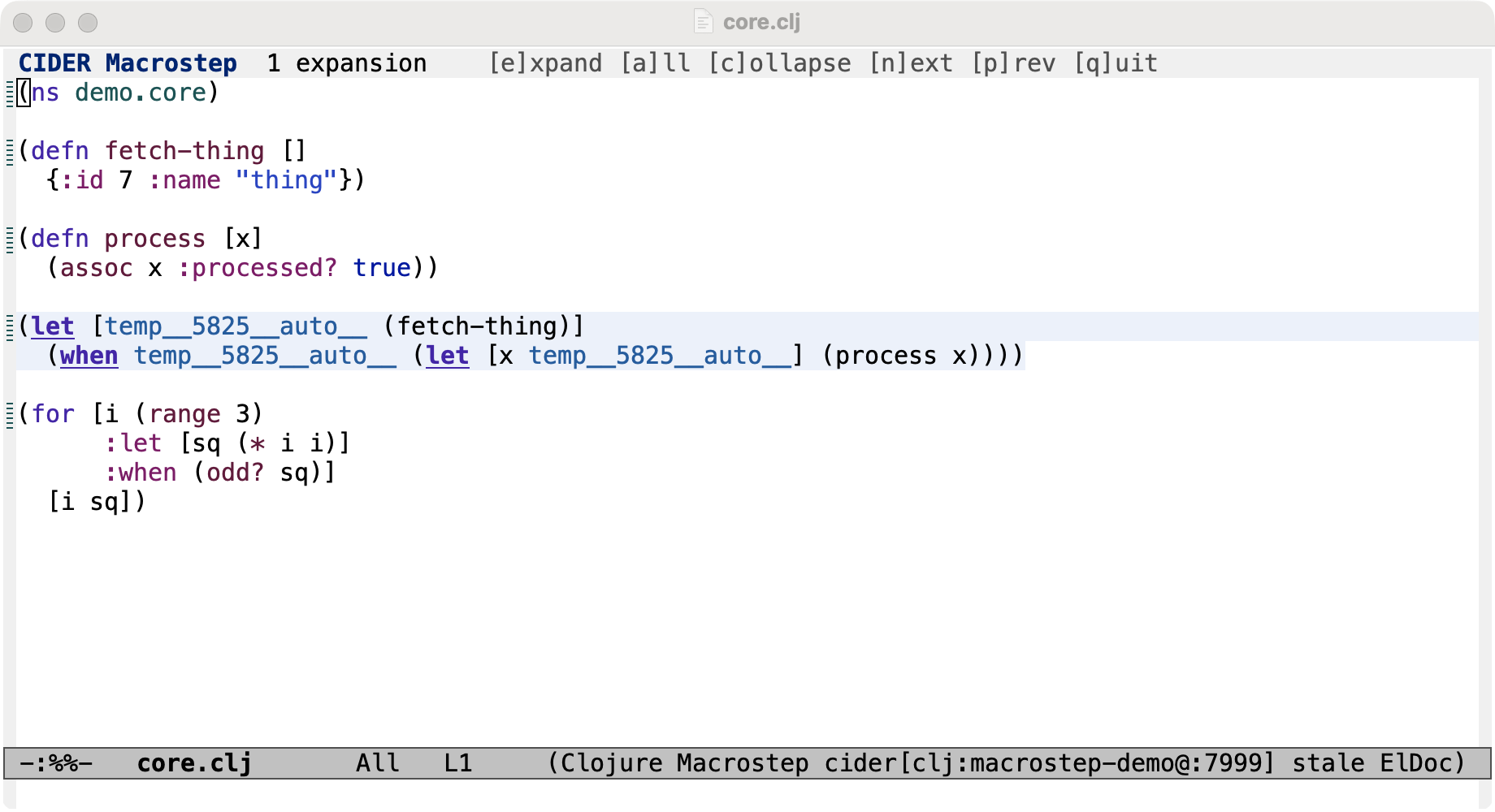
Each expansion remembers the exact text it replaced, so collapsing restores the
original verbatim and nested expansions peel back in order. The operators of
sub-forms that can be expanded further (those that resolve to a macro) are
underlined so you can see what’s left to expand, and n/p jump
between them. The gensyms a macro introduces (e.g. x42auto__) are each
given their own color, so a binding can be tracked through the expansion.
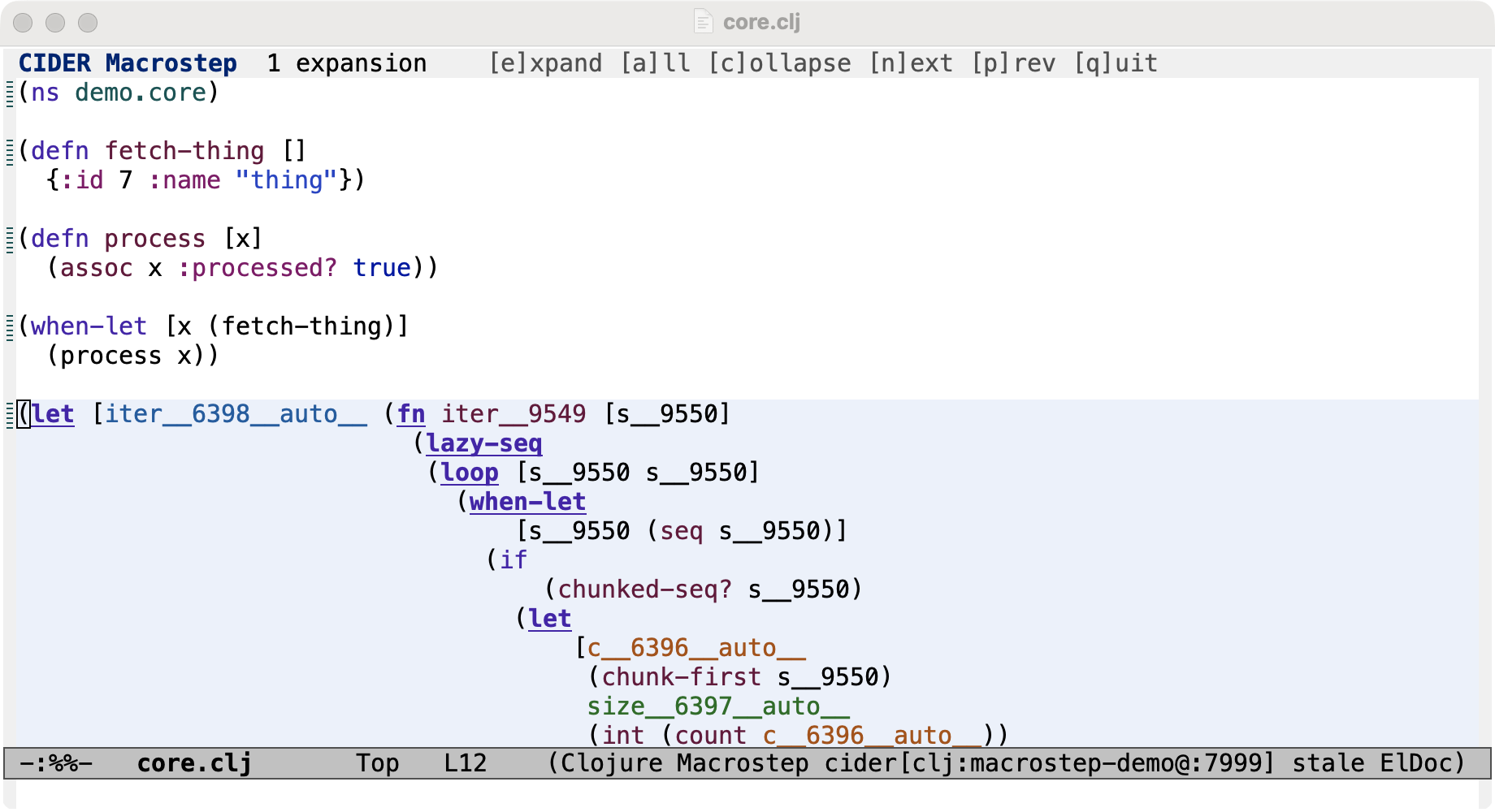
The expandable-head highlighting and gensym coloring rely on the
cider/classify-symbols nREPL op, available in cider-nrepl 0.60 and newer.
Without it the stepping still works, just without those visual aids.
|
If you’d rather not touch the source buffer, cider-macrostep-expand-in-buffer
runs the same stepping session in a dedicated *cider-macrostep* popup: it
copies the form before point there and you step through it exactly as above,
with the source left untouched. In the popup q dismisses the whole buffer
in one step.
Configuration
-
cider-macroexpansion-display-namespaces- how namespaces are displayed in the expansion (tidy,qualifiedornone); shared with the separate-buffer flow. -
cider-macroexpansion-highlight-expansion- briefly pulse a freshly inserted expansion (on by default); shared with the separate-buffer flow. -
cider-macrostep-highlight-expandable- underline the operators of further-expandable sub-forms (on by default). -
cider-macrostep-color-gensyms- colorize the gensyms introduced by an expansion (on by default). -
cider-macrostep-gensym-faces- the face palette cycled through when coloring gensyms (theme-aware, inheriting from font-lock faces).